#1 CRM for Outlook
The Best Outlook CRM
🆕 SalesOutlook CRM for Outlook, Teams and Microsoft 365. SalesOutlook is the No-Login CRM that runs anywhere you can run Outlook or Teams including PC, Mac, Web and Mobile.*
The CRM was designed to be as easy to use as your Inbox. Organize items using categories, folders and flags. Use our CRM to create Microsoft Outlook tasks and appointments.
Complete your Microsoft 365 experience by including a workgroup solution to track Contacts, Companies, Deals and Activities. Use email templates to send emails and campaigns.
Try SalesOutlook CRM for Free . No signup or Credit Card needed.


| Install CRM for Outlook |
|---|
 |
What We Offer
Automatic Filing of Emails
Use Outlook as you normally do and SalesOutlook CRM will autiomatically file Emails for you! No more lost communications or asking what was sent to a customer. Users automatically document as they send and receive emails.
Familiar Interface
The best CRM is the one you’ll actually use. Open Outlook or Teams and you are in your CRM. SalesOutlook's Outlook Style interface allows you to organize using categories, folders and flags. Create a follow up using Outlook appointments and tasks. Users need less training and will always be in the CRM.
Powerful Reporting and Analytics
Use Excel, Power BI or our built in dashboards for a wide range of reporting and analytics! Data analytics can give you insight into sales data and pipeline.
Advanced Workflow
Use the basic workflow to send email, approve items or automate tasks. Use Power Automate to create advanced workflows such as integrating data to Business Central.
Email Templates and Marketing.
Use SalesOutlook's email templates for individual emails or your email campaigns. Integrate into industry leading email marketing tools such as MailChimp.
Opportunity and Pipeline Management
Track your forecast and pipeline with SalesOutlook. Never lose a deal again.
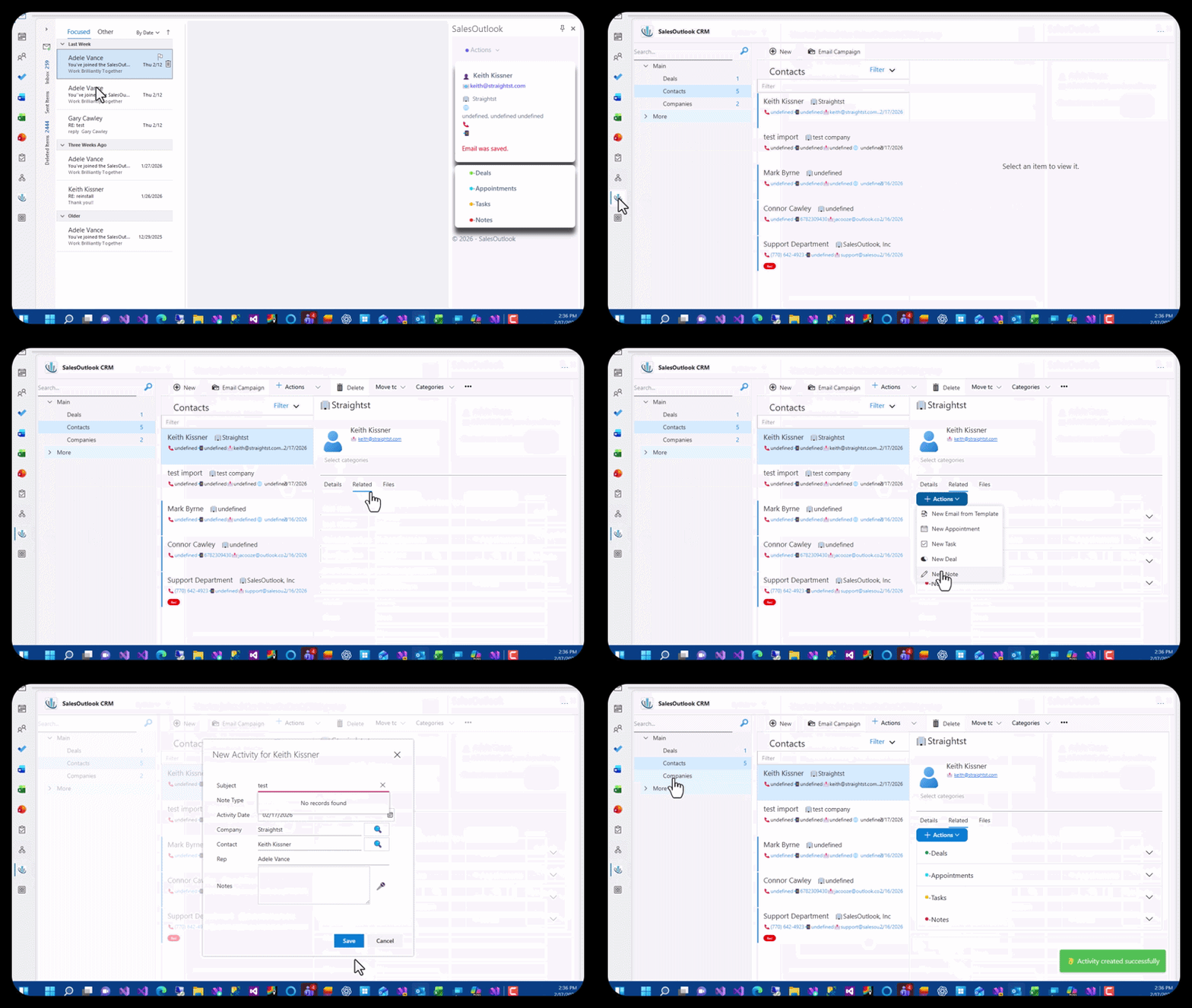
SalesOutlook is your no-login CRM for Outlook. Your CRM is anywhere you can open Outlook, Teams or Microsoft 365. Including Desktop and Mobile. No app to download. Enhance your Office Products by including a groupware application to track Companies, Contacts, Deals and Activities.
- Quickly see if a Contact is in the CRM from an Email.
- See all Activities and Emails for a Contact.
- Create a Contact from an Email.
Reporting is a must for a CRM. SaleOutlook has multiple ways of Reporting to fit your needs. Our most popular Reporting Tool is our Excel Reports. Easily create reports in the format you need including Pivot Charts, Pivot Tables, Drill Down and List Reports.
- Excel Reporting
- PowerBI Reports and Analytics
- Bulit in Dashboards

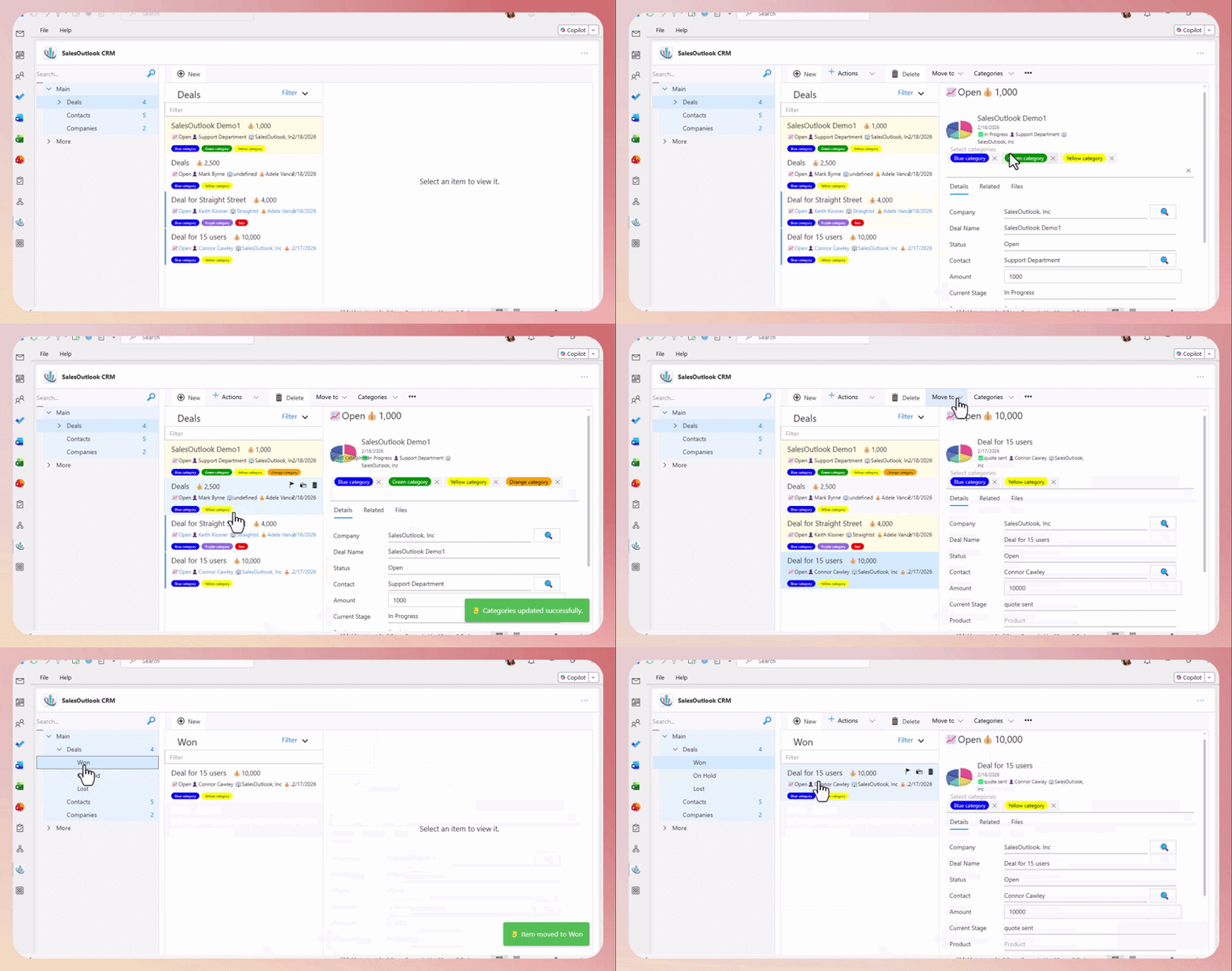
A sales opportunity can help businesses forecast future sales by analyzing historical data, industry trends, and sales patterns. Organize your data like Outlook with with categories, folders, flagged items, tasks and events. Use search and filter to see the data that is relevenat.
- Improved Sales Forecasting
- Enhanced Customer Engagement
- Streamlined Sales Process
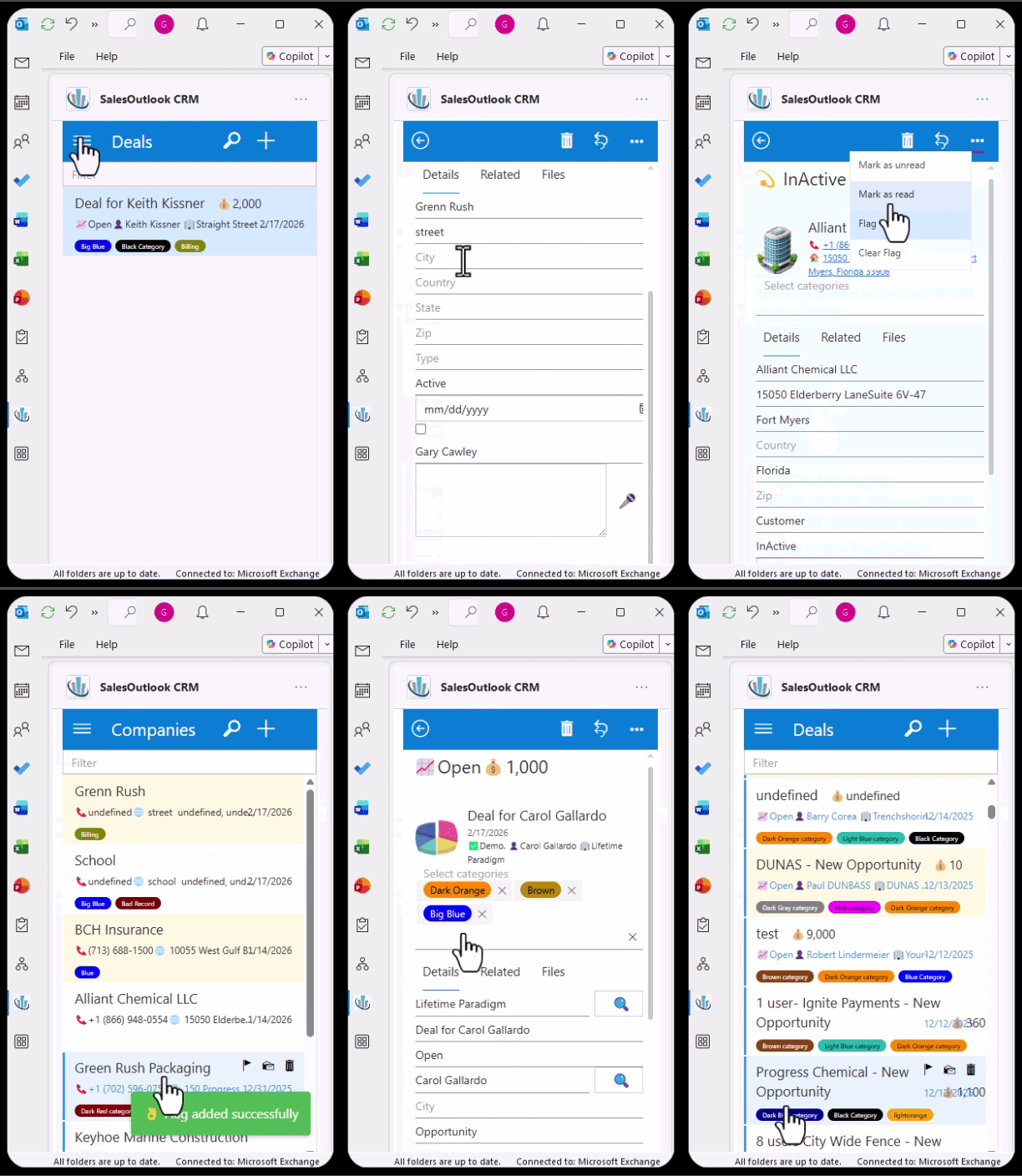
Works inside of Mobile Outlook and Teams, no app to download and configure.
- Easy Point and Click Interface
- Runs inside of Outlook or Teams mobile client.
- No Login - No App to download.
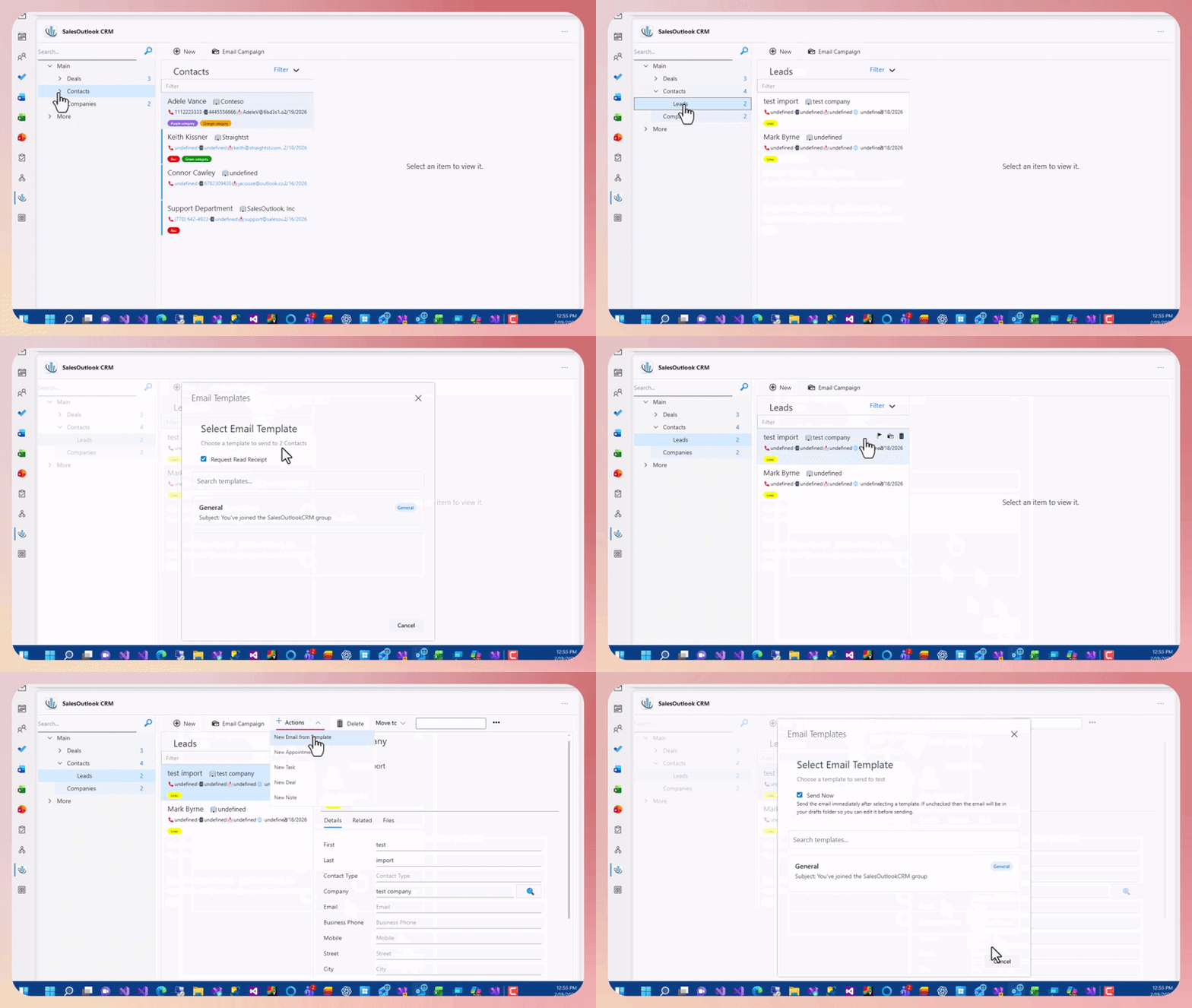
SalesOutlook provides for Email Templates that can be sent from an Email or Contact Record. Schedule a series of Emails, Tasks and Appointments with our Sales WorkFlow.
- Create Email Templates from an Existing Email.
- Send Mass Mailing.
- Best of Class Email Marketing with MailChimp. (optional)
Office Products Integration
Outlook
Outlook is used to keep track of Companies, Contacts, Opportunities, Customer Service and Activities. SalesOutlook uses the Outlook appointment and task items as you would normally use.
Teams
SalesOutlook CRM also runs inside of Microsoft Teams. This gives you another secure client to use on the Web, Desktop or mobile versions of Teams.
Excel
Excel is used for Advanced Custom Reporting. Excel can also be used to import and export data.
PowerBI
Power BI Desktop can be used for advanced analytics and AI style reporting. Get in sync with the most powerfull data analytics from Microsoft.
Data location and security - SharePoint
SalesOutlook stores all the CRM data in a SharePoint site. Your data is safe and in a location you can trust. If your Microsoft account is in US then the data is in the US. If your account is in Canada then your data is stored in Canada. Your data is stored on your Microsoft tenant.
Power Automate and CoPilot
While basic workflow is free there is also an advanced option to supercharge your workflow using Power Automate and CoPilot. A Power Automate license is required for advanced workflow. A CoPilot license is required to enchance the Power Automate workflow with AI.
Power your CRM with Advanced Integrations

Microsoft Forms

MailChimp

Business Central

See all Integrations
What Client's Say
Wanted to give some positive feedback – I thought we could all use some. The system if working very well and people are using it. Makes me very happy!

You guys run a good shop and are very serviceable. I would have no problem recommending you to anyone... Take care and thanks!!!
I am looking forward to getting everyone onboard with the system, because I love it, and think it will be such a value add to have them all on it with me.
A great CRM. By using this CRM our team is ensure that they never miss a lead and are always able to see the information that they need when they need it. I love how easy it was to get this CRM setup and running with-in our organization. In no time I was able to add a field and start tracking leads.
Finally a system that does just what I need One system to house all my information for clients, suppliers and onboarding SalesOutlook is straightforward, easy to use and customize without any hidden cost and great customer service. It's doesn't require learning a whole new product because it integrates right into Outlook
I have been utilizing SalesOutlook CRM for several months and I must say, I am impressed with its performance and features. Our retention rates and customer satisfaction have improved since we started using this platform. Integrating it with Outlook is seamless and very user-friendly, which makes it easier for us to manage customer relationships.
We decided on SalesOutlook for two main reasons: 1) It is integrated with the Outlook email client which we already use, and 2) It appeared to be intuitive, i.e. it works like the way our brains work.
Great for both novice and experienced CRM users Prior to implementing a CRM, we had no way to capture all of the sales intelligence. We needed an easy solution to start capturing this data. SalesOutlook has done just that. The implementation was seamless and the customer service is outstanding. Quick response every time we have a question or an issue.
SalesOutlook CRM is a fast, intuitive, simple and a highly customizable Outlook CRM add-in which makes it ideal for a wide range of businesses. Essentially you get what you pay for, and SalesOutlook offers better value-for-money in our opinion.
Latest News & Blog

New SalesOutlook CRM. Run your CRM from anywhere
Run your CRM anywhere at any time.SalesOutlook CRM can now run anywhere you can run Outlook, Teams or Microsft 365 Copilot portal. Open SalesOutlook on a PC, Mac or any mobile device with the same interface. No login or app download necessary.
Read More
Powerful Integrations using Power Automate
SalesOutlook users can now integrate to almost any other system. Use Microsoft Forms to automatically enter a lead into the CRM. Automatically create a company and contact in Business Central from the CRM. Add and remove users in MailChimp by adding a category to a contact in the CRM. The integrations are endless based on your imagination. Basic email and workflows are free. Purchase a Microsoft Power Automate license for advanced Workflows.
Read More
Are you Ready for AI?
SalesOutlook CRM is AI ready. Just purchase a Microsoft Copilot license and use Copilot Studio to create knowledge agents. More to come as AI evolves!
Read MoreStart Your Outlook CRM Project. It's Simple And Affordable
Get Started Today! We can have you up and running within the hour.